Accruent Lucernex 25.12 Release Notes
We're delivering this automatic upgrade to UAT (TRAIN) environments on November 21, 2025, and to production environments on December 5, 2025, with these highlights:
-
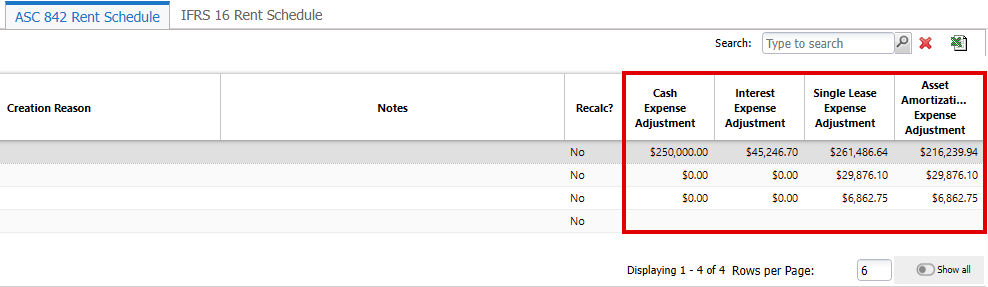
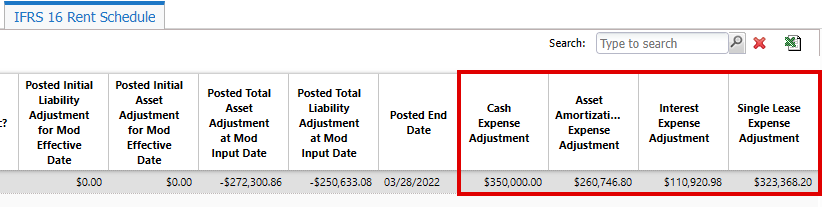
Late amendment liability adjustment: Existing SLSummary fields split into cash and interest components for rent schedule calculations, saving you time by avoiding recording cash and interest components manually.
-
Sticky headers: Understand and update information easily on the Manage Data Fields, Manage Security, and View Object Model pages of the System Administrator Dashboard when scrolling.
-
Reset Password: Reset your password quickly and securely.
-
Database schema changes: Added fields to the database schema for enhancements in this release.
Late amendment liability adjustment
LUC-17659, Customer case: 01749622
These existing fields in SLSummary are now split into their cash and interest components for rent schedule calculations:
-
Posted Initial Asset Adjustment for Mod Effective Date
-
Posted Initial Liability Adjustment for Mod Effective Date
-
Posted Total Asset Adjustment at Mod Input Date
-
Posted Total Liability Adjustment at Mod Input Date
These new SLSummary fields save you time, avoiding recording cash and interest components manually:
Calculations in the new fields depend on a minimum of two schedules. Equivalent posted periods may be derived from one or more prior schedules. Calculations apply to current data and are not applied in retrospect.
Add these fields to your page layouts to display them.
ASC 842 Rent Schedule
IFRS 16 Rent Schedule
Sticky headers
LUC-17264, LUC-17263, LUC-17258
Headings for lists in these System Administrator Dashboard pages are now sticky, so they remain visible as you scroll:
-
Manage Data Fields
-
Manage Security
-
View Object Model
This fixes the headings of each column to the top of the page, enabling administrators to easily understand and accurately update information in long lists without having to scroll the top of the page.
Reset your password
LUC-18319
Resetting your password is now simpler and more secure.
-
On the Lucernex sign in page, enter your Username and Firm, then click Next.
-
Click Forget password?.
-
Enter your Username and Firm, then click Email Password Reset Link.
-
In the Password Reset email, click Reset Password.
-
Enter your new password, confirm it, then click Reset Password.
-
Sign in with your new password.
Database schema changes
We've added fields to the database schema for enhancements in this release.
New fields do not automatically display in customized pages, add them to your page layouts to display them. Custom pages are indicated by the  icon in the lower right of the dialog or window.
SLSummary Fields
|
Field Name |
Type |
UI Label |
Description |
|---|---|---|---|
|
Currency |
Asset Amortization Expense Adjustment |
Calculates late amendment catchup information for Asset Amortization Expense using the formula: SUM(Asset Amortization Expense for current schedule non postable periods) - SUM(Asset Amortization Expense for POSTED periods of prior schedules) |
|
|
Currency |
Cash Expense Adjustment |
Calculates late amendment catchup information for Cash Expense using formula: SUM(Cash Expense for current schedule non-postable periods) - SUM(Cash Expense for POSTED periods of prior schedules) |
|
|
Currency |
Interest Expense Adjustment |
Calculates late amendment catchup information for Interest Expense using the formula: SUM(Interest Expense for current schedule non-postable periods) - SUM(Interest Expense for POSTED periods of prior schedules) |
|
|
Currency |
Single Lease Expense Adjustment |
Calculates late amendment catchup information for Single Lease Expense using the formula: SUM(Single-Lease Expense for current schedule non-postable periods) - SUM(Single-Lease Expense for POSTED periods of prior schedules) |
Improvements and issues fixed
|
Summary |
Reference # / Customer Case |
|
|---|---|---|
| Bidding | The Accept/Reject Bid Invitation dialog now shows the correct Bid Due Time as indicated on the bid package summary even if the system time zone is changed. |
LUC-12487 01551705 01550614
|
|
Capital Program Setup Wizard |
In the Capital Program Setup Wizard, you can now select a Start on or End by date for the schedule template you select on the Schedule Set-up step. You can also successfully complete the wizard without selecting a schedule template. |
LUC-15909 01711189 01711097 |
|
Conditional fields |
In property pages, warning messages only display when conditional formatting is applied. Conditional fields no longer momentarily display. |
LUC-14903 01696451 01695958 |
|
Documents |
When you click View in a linked document, that document now displays in the Lucernex document viewer instead of downloading. |
LUC-18088 LUC-17476 01745760 01757087 01747863 01746338 01745715 01745666 01747151 |